
SAP PP Integration with Other Modules MM, SD, FICO
SAP Production Planning (PP) never works alone. In real-life manufacturing companies, PP talks directly with MM, SD, and FICO to keep materials flowing, production running, orders selling, and financial values updated. Understanding these integrations makes PP much easier to work with and avoids major business errors.
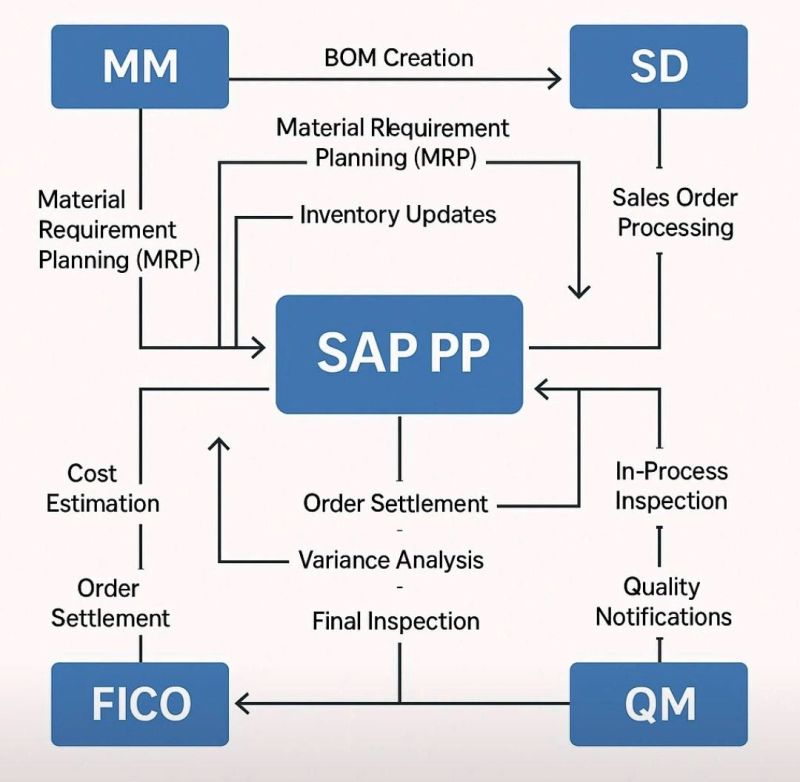
Integration of SAP PP with SAP MM (Materials Management) –
PP and MM work closely because PP needs materials to produce finished goods, and MM manages how materials are procured, stored, and issued. This integration ensures correct stock levels, accurate material consumption, and proper procurement triggers.
Key Integration Points -
- BOM Components (PP) → Material Master (MM)
- Raw materials, semi-finished goods, and components used in BOM must exist and be maintained in MM.
- Material type, UOM, procurement type, MRP views connect PP to MM.
- MRP (PP) → Purchase Requisitions (MM)
- When PP runs MRP and detects shortages, it automatically creates Purchase Requisitions in MM.
- These PRs are converted into PO by the MM team.
- Goods Issue (MM) for Production Order (PP)
- During production, materials are issued from inventory (MB1A/MIGO).
- Stock reduces and production order gets material consumption recorded.
- Goods Receipt (MM) for Finished Goods (PP)
- After production confirmation, PP posts a Goods Receipt.
- This increases stock of Finished Goods in MM stores.
Business Example -
If the PP team creates a production order for 500 chairs, MM makes sure wood, nails, and paint are issued in correct quantities and the finished chairs are received into inventory.
Integration of SAP PP with SAP SD (Sales & Distribution) –
SD handles customer orders, and PP uses those requirements to plan and execute production. Without SD data, PP cannot decide what needs to be produced and when.
Key Integration Points -
- Sales Orders (SD) → Demand in MRP (PP)
- Customer sales orders create dependent requirements.
- MRP uses this demand to plan production and generate planned orders.
- Availability Check (SD) uses PP stock and planned orders
- SD checks if enough stock is available using real-time PP/Inventory stock data.
- If not available, PP must produce or procure.
- Make-to-Order Production (SD/PP)
- For MTO scenarios (Strategy 20), SD order directly triggers a Production Order in PP.
- Production is done specifically for that customer.
- Delivery (SD) after Goods Receipt (PP)
- Finished goods received from PP become available for SD outbound deliveries.
Business Example -
If a customer orders 200 customized tables, SD captures the order, PP produces them, and SD ships them after PP completes production.
Integration of SAP PP with SAP FICO –
Every production activity—material consumption, labor, machine hours, overhead—has a cost. PP tracks the activity, but the actual financial postings go to FICO. This ensures accurate product costing and profitability.
Key Integration Points -
- Production Order Costing (PP) → FICO
- When materials are issued (GI), costs get posted to the production order.
- When labor/activity is confirmed, activity costs update the order.
- Variance Calculation and Settlement (PP/FICO)
- At the end of production, the system compares planned cost vs actual cost.
- Variances are calculated and settled to Cost Centers/CO-PA in FICO.
- Goods Receipt (PP) → Accounting Entries (FICO)
- When finished goods are received, FICO gets accounting entries like - Debit: Finished Goods Inventory, Credit: Production Order/Cost of Goods Manufactured.
- Work Centers (PP) → Cost Centers (FICO)
- Work Centers defined in PP must be linked to Cost Centers in FICO.
- Activity rates (machine hour cost, labor hour cost) come from FICO.
Business Example -
If a production order consumed ₹50,000 of raw materials and ₹20,000 labor, all those values flow into FICO. After settlement, FICO calculates the final cost per piece and updates the inventory value.